- meta.DJ is an app that promises to combine "DJing and dance production," uniting song mixing and loop playback with beat and synth building. The developers, Sound Trends, have had a history with music apps; they're behind Studio (multi-track loop arranger with effects), Grüvtron (preset-based dance production tool), and Looptastic (performance loop mixer and processor with user import). For their next move, it looks like somebody at Sound Trends decided to mash-up a number of their existing apps to make a new one, resulting in meta.DJ, which features Looptastic, Drumtron and SaMPL3R (basically the beats and synth elements of Grüvtron), and—the new boy—Track Deck. An app that cobbles together bits of others could potentially be a train wreck, but somehow meta.DJ makes sense, and has something to offer over the typical DJ app.
When you start a new meta.DJ set, you're faced with four blank squares—tap in the centre of each to load one of the instruments; there's no restriction regarding how many of each you use. Track Deck's the most DJ-like option: load a song from your device's music library, and assign up to four loops, manually setting start/end points, or using the auto loop button, which will instantly make loops ranging in length from 1/16th note to 32 bars; there are also 1/2x, 1x and 2x loop speed buttons, plus a Set Grid button. The song's original tempo is detected and displayed, although playback follows the BPM value at the top right of the screen. The loop markers aren't recalled if you reload a song later, but they are saved with the set. Track Deck's works well, especially given that you can combine up to four at once.
Looptastic syncs and mixes up to ten audio loops and one-shots from sets you've purchased in-app or ones you've created yourself and imported via iTunes; only seven packs are included, so you'll definitely need to get more from somewhere. This is a fantastic way to contain many loops in one instrument within the app, with individual level controls over each. The original Looptastic effects section, with its X-Y control area, has been spun off to form the basis of meta.DJ's effects, so we'll talk more about that later.
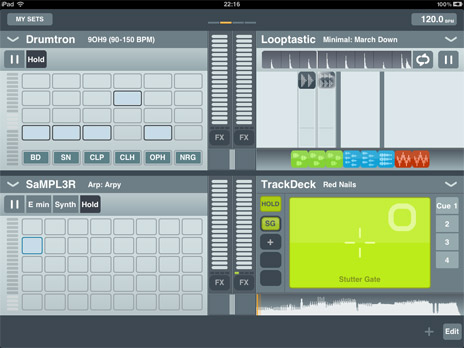
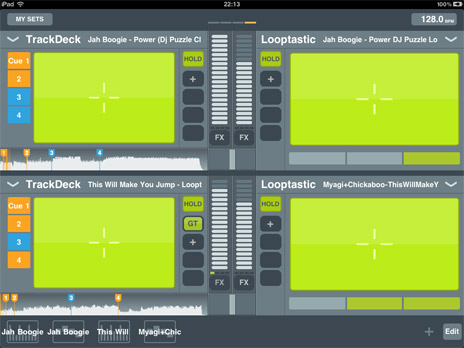 Track Deck and Looptastic are the most interesting sections for a producer/performer, as they let you add personalised source material. SaMPL3R and Drumtron are "locked," in as much as you have to work with the presets you're given. SaMPL3R uses an 8x5 grid, or a virtual keyboard, to trigger preset sounds and patterns. You can't edit this, other than using the touch filter control, and choosing the pitch and key of the playback; choose from a list of notes, then a scale type. It's not a full synth by any means, but useful for a little ear candy during a set, perhaps.
Drumtron works on a similar basis to SaMPL3R (and to the drum machines in GarageBand iOS), using a grid-based pattern building tool. It includes eight kits with eight drum sounds in each, and each sound has a preset pattern with up to four levels of complexity. The touch strip works as a pitch control across the entire kit, which is a nice touch. Drumtron helps if you quickly want to add synced drums during a set, but other than that it doesn't achieve much, especially with the small number of kits on offer.
The Looptastic effects, with their X-Y touchpad interface, have been raided to provide sound processing for each instrument. Tap the FX button for any instrument to reveal the touchpad and to assign an effect to one of four buttons. There are 15 effects to choose from, including filters, EQ, Bitcrusher, Stutter Gate, Compressor and Reverb. A Hold button locks the X-Y coordinates, so when you get a cool sound, you don't have to keep your finger there for the rest of the tune. Each instrument also features a volume fader and crossfader.
A settings menu contains an on/off switch for cueing output—you'll need a dual mono cable, like Griffin's DJ Cable, and to use the headphone icon which subsequently appears next to each instrument. There's no sync option at all, which is a shame as it would be such a beautiful experience to sync meta.DJ with a more functional synth app running on another iPad.
Track Deck and Looptastic are the most interesting sections for a producer/performer, as they let you add personalised source material. SaMPL3R and Drumtron are "locked," in as much as you have to work with the presets you're given. SaMPL3R uses an 8x5 grid, or a virtual keyboard, to trigger preset sounds and patterns. You can't edit this, other than using the touch filter control, and choosing the pitch and key of the playback; choose from a list of notes, then a scale type. It's not a full synth by any means, but useful for a little ear candy during a set, perhaps.
Drumtron works on a similar basis to SaMPL3R (and to the drum machines in GarageBand iOS), using a grid-based pattern building tool. It includes eight kits with eight drum sounds in each, and each sound has a preset pattern with up to four levels of complexity. The touch strip works as a pitch control across the entire kit, which is a nice touch. Drumtron helps if you quickly want to add synced drums during a set, but other than that it doesn't achieve much, especially with the small number of kits on offer.
The Looptastic effects, with their X-Y touchpad interface, have been raided to provide sound processing for each instrument. Tap the FX button for any instrument to reveal the touchpad and to assign an effect to one of four buttons. There are 15 effects to choose from, including filters, EQ, Bitcrusher, Stutter Gate, Compressor and Reverb. A Hold button locks the X-Y coordinates, so when you get a cool sound, you don't have to keep your finger there for the rest of the tune. Each instrument also features a volume fader and crossfader.
A settings menu contains an on/off switch for cueing output—you'll need a dual mono cable, like Griffin's DJ Cable, and to use the headphone icon which subsequently appears next to each instrument. There's no sync option at all, which is a shame as it would be such a beautiful experience to sync meta.DJ with a more functional synth app running on another iPad.
 Although this exercise in app recycling works brilliantly well as it is, there are missing features, like MIDI control (though meta.DJ does work with Numark's iDJ Live controller), and more expansion within the preset drum and synth sounds in drumtron and SaMPL3R. meta.DJ also needs to remember user-defined loop points when a song is re-loaded. I'd also like a way to record and export live performances as stereo files in the same way that you can in the standalone version of Looptastic.
There's intense competition in the music app field, and any new app has to find a niche of its own. Serious songwriter/producer types should be using GarageBand, no question, if only because it upscales to Logic Pro so easily. For live performance, though—and meta.DJ is clearly a pure performance app—there are many apps that do one thing, or two things. Not many let you juggle four sound sources in the convincing way that meta.DJ does (never mind combining song playback, drum machine, synth and loop mixing all in one).
This is SoundTrends' best shot so far at producing a killer iPad music app, although meta.DJ is somewhat let-down by the lack of sync and MIDI capabilities. Despite those criticisms, though, this is far and away the closest anybody's got so far to the ultimate live performance app, and it's a must-have for all iPad music people.
Ratings
Cost: 5/5
Build: 5/5
Versatility: 4/5
Ease of use: 4/5
Although this exercise in app recycling works brilliantly well as it is, there are missing features, like MIDI control (though meta.DJ does work with Numark's iDJ Live controller), and more expansion within the preset drum and synth sounds in drumtron and SaMPL3R. meta.DJ also needs to remember user-defined loop points when a song is re-loaded. I'd also like a way to record and export live performances as stereo files in the same way that you can in the standalone version of Looptastic.
There's intense competition in the music app field, and any new app has to find a niche of its own. Serious songwriter/producer types should be using GarageBand, no question, if only because it upscales to Logic Pro so easily. For live performance, though—and meta.DJ is clearly a pure performance app—there are many apps that do one thing, or two things. Not many let you juggle four sound sources in the convincing way that meta.DJ does (never mind combining song playback, drum machine, synth and loop mixing all in one).
This is SoundTrends' best shot so far at producing a killer iPad music app, although meta.DJ is somewhat let-down by the lack of sync and MIDI capabilities. Despite those criticisms, though, this is far and away the closest anybody's got so far to the ultimate live performance app, and it's a must-have for all iPad music people.
Ratings
Cost: 5/5
Build: 5/5
Versatility: 4/5
Ease of use: 4/5